

How to Convert ACSM to PDF the Right Way in 2026

Ayush Soni
Founder, File Studio
On this page
- What Is an ACSM File and Why Wont It Open
- Think of ACSM as a claim ticket
- Why people get stuck here
- The Official Method Using Adobe Digital Editions
- Why Adobe Digital Editions is required
- The exact workflow that works
- Understanding and Handling Adobe DRM Protection
- What ADE gives you and what it doesn't
- The offline workflow people actually use
- Online Converters and Important Legal Considerations
- Why web converters usually fail
- The legal gray area in plain English
- Managing Your New PDF with Offline Tools
- What to do after conversion
- Why local PDF handling matters
- Common ACSM Conversion Questions Answered
- What if the ACSM file is expired
- Can this work for library books and tablets
- Can you do this without an Adobe ID
You bought or borrowed an ebook, clicked download, and ended up with a tiny .acsm file that won't open like a book. That's the moment the file is often assumed to be broken.
It usually isn't. The problem is that an ACSM file isn't the book you wanted. It's the permission slip that fetches the book through Adobe's system. If your goal is to convert ACSM to PDF for personal reading, backup, or offline archiving, the path is narrower than most guides admit. The official Adobe step is required first. Then, in many cases, there's a second step that deals with DRM so the file is functional outside Adobe's ecosystem.
What Is an ACSM File and Why Wont It Open
An ACSM file looks like an ebook download, but it isn't one. Adobe introduced the ACSM format as a secure container for ebooks, and it functions strictly as a download token rather than a readable document; it requires authorization through Adobe Digital Editions to retrieve the actual book, which is then saved locally as a PDF or EPUB, as explained in Wondershare's ACSM overview.
That explains the most confusing part of this process. You double-click the file and nothing useful happens because there's no book content inside it to read.
Think of ACSM as a claim ticket
If you've ever used coat check at an event, the ACSM file works the same way. The paper ticket isn't the coat. It's the thing you present so the system gives you the coat.
With ACSM, Adobe Digital Editions acts as the desk clerk. It reads the token, checks whether your Adobe authorization is valid, then downloads the eBook.
Practical rule: If you only have an .acsm file, you do not yet have the ebook itself.
Why people get stuck here
Most users expect one of these results:
- A normal PDF file: Something they can open in Preview, Acrobat, or a browser.
- A standard EPUB file: Something they can drop into an ereader app.
- A file they can convert immediately: Something Calibre or a web converter can ingest without extra steps.
An ACSM file is none of those things.
That's also why generic file converters are such a poor fit. They're designed to transform one real file format into another. An ACSM file is more like an instruction to Adobe's servers than a source document.
Here's the practical takeaway. If you want to convert ACSM to PDF, your first job isn't conversion. It's redeeming the ACSM file into the actual ebook file.
The Official Method Using Adobe Digital Editions
Adobe Digital Editions, usually called ADE, is the only reliable first step because it can talk to Adobe's licensing system and fetch the actual protected ebook.
Why Adobe Digital Editions is required
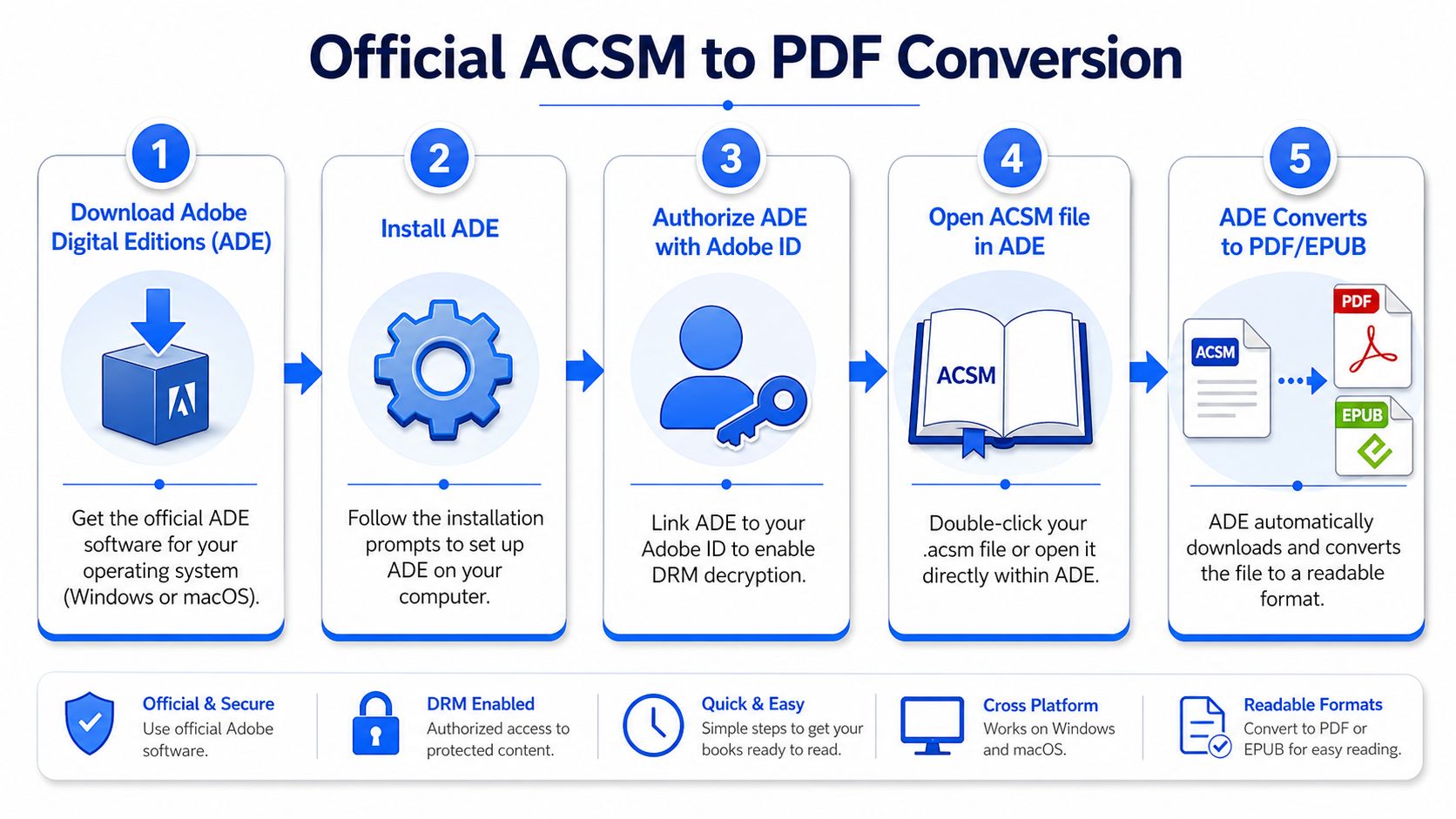
The process is straightforward on paper. The ACSM file is a license token that triggers Adobe Digital Editions to download the actual EPUB or PDF. The required workflow is to install ADE, authorize the computer with an Adobe ID, add the .acsm file to the library, and wait for the finished file to appear in the My Digital Editions folder, as outlined in PDF.ai's ACSM conversion guide.
In practice, authorization is the part people skip. That's usually where the failure begins.
If ADE opens but your computer isn't properly authorized, Adobe's system may refuse the download or leave you with a file that won't behave the way you expect. This is not optional if you're working through the official route.
The exact workflow that works
Install Adobe Digital Editions on Windows or macOS. Launch it before touching the ACSM file. In the app menu, go to the authorization option and sign in with an Adobe ID.
Then import the ACSM file. Depending on your system, double-clicking the file may open it in ADE automatically. If it doesn't, use the app's library import option and select the file type for Adobe Content Server Message if needed.
What should happen next is simple. ADE contacts Adobe's content server, verifies your license, and downloads the actual book.
Look for the finished file in the local Digital Editions folder. That file may be an EPUB or a PDF, depending on how the seller or library delivered the title.
A quick checklist helps here:
- ADE is installed: The ACSM file has something valid to open with.
- The computer is authorized: The license check can complete.
- The ACSM file opens inside ADE: The token gets redeemed.
- A real ebook appears locally: You now have something tangible to work with.
If ADE never downloads the book, stop troubleshooting converters and fix authorization first.
A final note from experience. The official method often feels like conversion, but it's really retrieval. ADE doesn't enable format freedom by itself. It merely pulls down the licensed file and stores it on your machine.
Understanding and Handling Adobe DRM Protection
This is the step most tutorials blur or skip. You redeemed the ACSM file. You found the EPUB or PDF in your Digital Editions folder. You still may not have a file you can fully use on your own terms.
What ADE gives you and what it doesn't
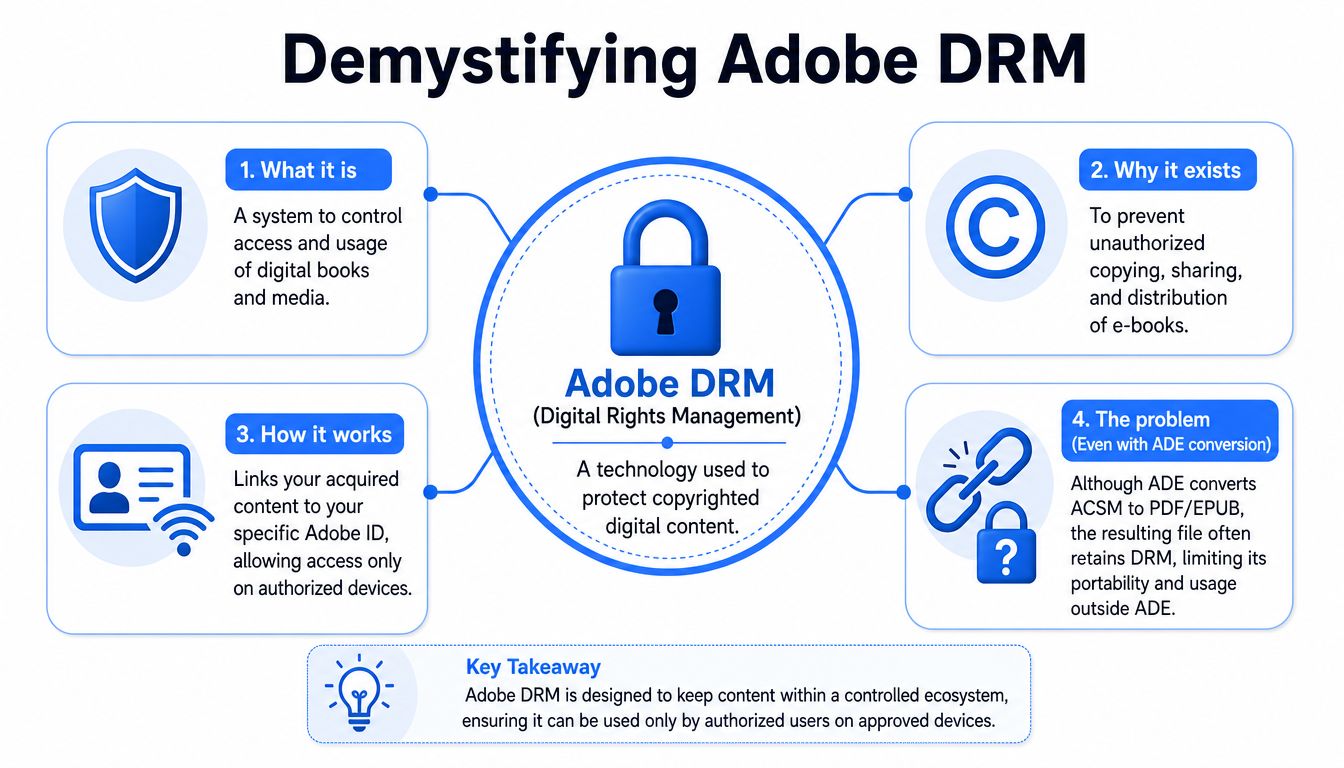
ADE gives you the licensed file. It does not always give you a file that's portable, editable, or free of restrictions.
That matters if you want to archive a purchase, move it to a different reading setup, annotate it in your preferred software, or keep a personal offline backup that isn't tied to Adobe authorization. A lot of frustration comes from this exact misunderstanding. People think the job is done once ADE downloads the book, then discover the resulting file is still locked to Adobe's DRM system.
The technical reason web tools fail so often is the same reason this second step exists. According to LightPDF's ACSM conversion analysis, 88% of failed attempts with online converters end in errors because the tool can't decrypt the content server message. The same source says the most reliable path is a two-step offline pipeline: first use ADE to extract the licensed EPUB or PDF locally, then convert that EPUB to PDF using Calibre with the latest NoDRM plugin to remove Adobe's encryption. It describes this workflow as achieving near-100% success.
The offline workflow people actually use
The community-standard approach is usually:
| Stage | Tool | What happens |
|---|---|---|
| License redemption | Adobe Digital Editions | The ACSM token downloads the actual ebook |
| Library import | Calibre | The downloaded file is added to a local ebook manager |
| DRM handling | NoDRM or similar plugin for Calibre | Adobe restrictions are removed for personal offline use |
| Format conversion | Calibre | EPUB can be exported as PDF |
This isn't magic. It's just separating two different jobs that many guides mash together.
First, Adobe verifies that you're entitled to the book. Then, if your goal is personal backup or offline archival, Calibre handles the local library side and the final format conversion. If the ADE download is an EPUB, that's often the cleanest file to convert into PDF afterward.
A file that opens only on authorized devices isn't much of an archive.
There's a similar pattern in other ebook ecosystems too. If you've dealt with Kindle restrictions before, the same portability problem shows up in a different wrapper. This walkthrough on how to download a Kindle book as PDF is useful for seeing how format control and DRM often get tangled together.
A practical warning belongs here. Plugin availability, compatibility, and local law can change. Calibre is mainstream and stable, but DRM plugins live in a shifting, unofficial space. If you go this route, keep the workflow local, keep your copies personal, and test with one book before processing a whole library.
Online Converters and Important Legal Considerations
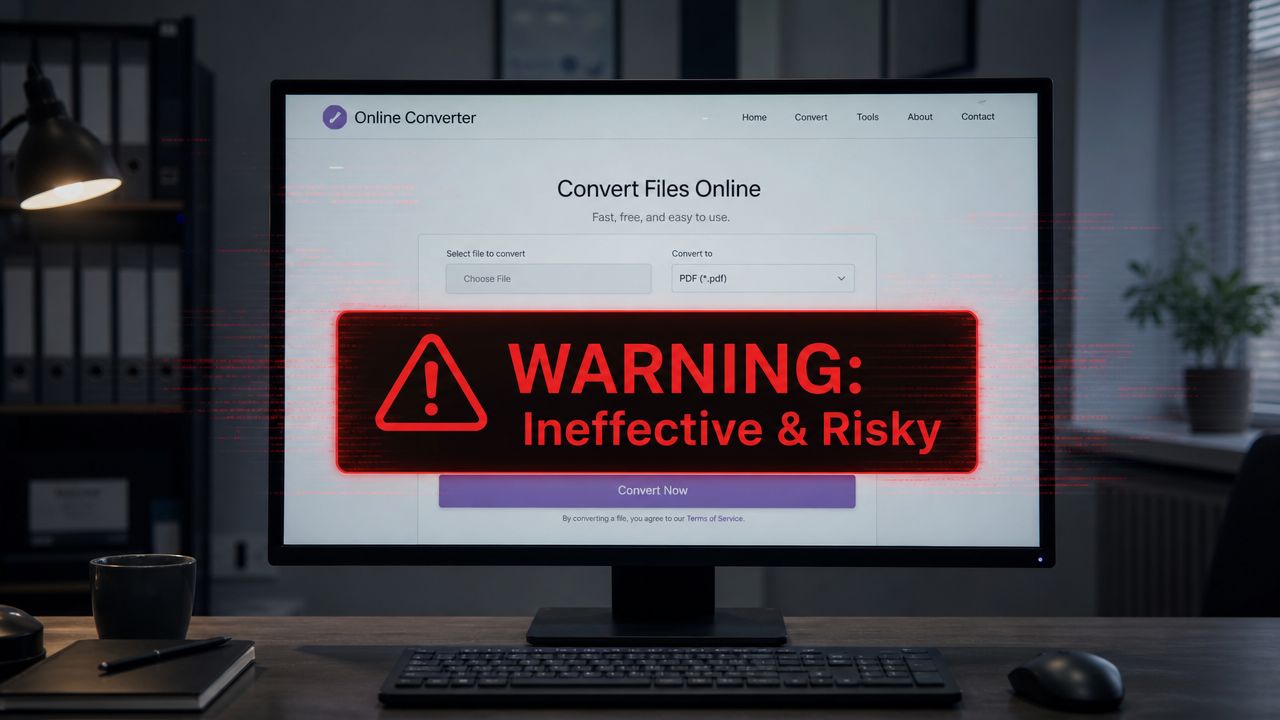
If a site promises instant ACSM-to-PDF conversion in your browser, treat that promise skeptically.
Why web converters usually fail
The technical problem is simple. An ACSM file isn't the readable book, and the website doesn't have your Adobe authorization context. It can't stand in for your licensed device unless it's somehow integrated into Adobe's DRM system and using your credentials properly.
That's why the browser route tends to collapse into errors, blank output, or fake progress bars. It's also a privacy issue. The people looking up ACSM conversion are often dealing with textbooks, professional references, legal publications, or internal training material. Uploading those files to a random converter undermines the whole point of keeping a controlled personal archive. A privacy-first explanation of that trade-off appears in this piece on offline file conversion and local processing.
If your actual need is a normal document workflow after the book's content is made available, use purpose-built tools for that later step. For example, if you write notes or documentation in plain text, a separate guide on how to convert Markdown to PDF is relevant because it deals with a real source format, not a license token.
The legal gray area in plain English
This part depends on where you live and what kind of book you're handling. DRM removal can sit in a legal gray area even when your intent is narrow and practical.
Some readers remove DRM for personal backup, accessibility, device interoperability, or offline archival. That's very different from redistribution, file sharing, or reposting books online. The ethical line is clear even when the legal line is not.
Keep your use conservative:
- Personal reading copies: Safer in spirit than sharing with others.
- Private archival: Reasonable for many users who want control over books they obtained lawfully.
- No redistribution: The moment files leave your private library, the risk changes.
I'm not giving legal advice. I am saying that if you choose to remove DRM, do it for your own library management and keep the entire process offline.
Managing Your New PDF with Offline Tools
Once you finally have a clean PDF, the work becomes normal document management again. That's a relief.
What to do after conversion
A converted ebook PDF often needs cleanup. Maybe the file is too large for email. Maybe the chapter order is awkward. Maybe you've got multiple PDFs that should live as one volume. Sometimes the issue is metadata, not pages.
Those are ordinary PDF tasks, but they matter more when the source material is sensitive or personally curated. Reddit discussions around ACSM workflows point out that many guides skip the DRM-removal step entirely, which leaves users with locked files and pushes them toward cloud tools that often fail and may clash with privacy requirements, as highlighted in this discussion of offline ACSM workflows and DRM pain points.
A clean post-conversion routine usually includes a few tasks:
- Compression: Reduce file size for email, syncing, or storage.
- Merging: Combine chapters or append notes into one PDF.
- Reordering: Fix front matter, appendices, or extracted pages.
- Metadata cleanup: Remove authoring traces or software history you don't want embedded.
Why local PDF handling matters
Books often carry notes, publication details, and embedded metadata that you may not want to pass through an online service. If you've gone to the trouble of keeping the conversion workflow local, it makes sense to keep the management workflow local too.
For metadata specifically, it helps to inspect and clean the file before sharing it with coworkers, students, or clients. This guide on how to remove PDF metadata is a good reference for that final hygiene step.
The safest ebook workflow is consistent from start to finish. Local download, local cleanup, local storage.
This is the part many people underestimate. Converting ACSM to PDF is only half the problem. Making the PDF portable, compact, clean, and private is what turns a rescued ebook into a useful working file.
Common ACSM Conversion Questions Answered
What if the ACSM file is expired
ACSM files can stop working if the fulfillment window has passed or the vendor link has been invalidated. When that happens, the fix usually isn't technical. You need a fresh download link from the bookstore, library portal, or seller account.
Can this work for library books and tablets
Library books are often the hardest case because lending rules are stricter and return dates matter. The official ADE step may still work for checkout and reading, but what you can do afterward depends on the license terms attached to that loan.
On iPad or Android, reading through vendor-supported apps is usually easier than trying to do the full workflow there. The conversion and archive process is much more manageable on a Mac or Windows computer.
Can you do this without an Adobe ID
For the official method, Adobe authorization is the normal path. If you can't authorize ADE, you're likely to get stuck before the actual EPUB or PDF arrives locally.
If your main question is whether you can skip ADE entirely, the practical answer is no. The ACSM file isn't a readable book, so something has to redeem that token through Adobe's system first.
If you're building a private offline library and want the final PDF to stay local while you compress, merge, reorder, or clean it up, File Studio fits that workflow well. It runs on macOS and Windows, handles PDF management on-device, and avoids the upload cycle that makes cloud converters a bad fit for sensitive documents.