

JPG to WebP converter
JPG to WebP - Convert JPG photos to WebP for modern web optimization.
WebP gives you smaller files than JPG at comparable visual quality. Perfect for websites where every kilobyte of page weight matters.
Free trial · No account required · Files stay on your device
All conversions happen locally on your computer. No uploads, no subscriptions, and no background syncing.
JPG → WebP
Real File Studio interface, shown in light and dark mode.
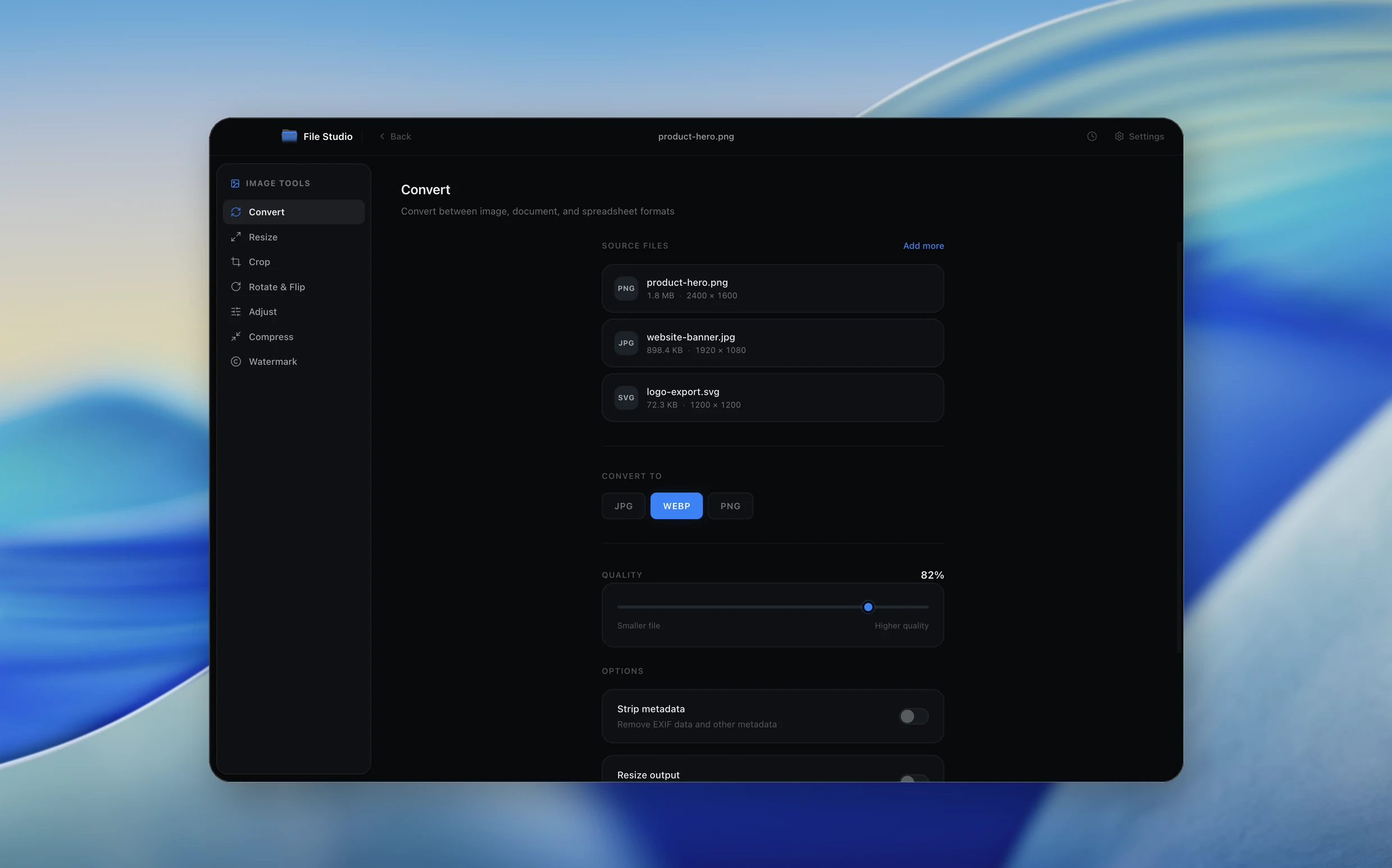
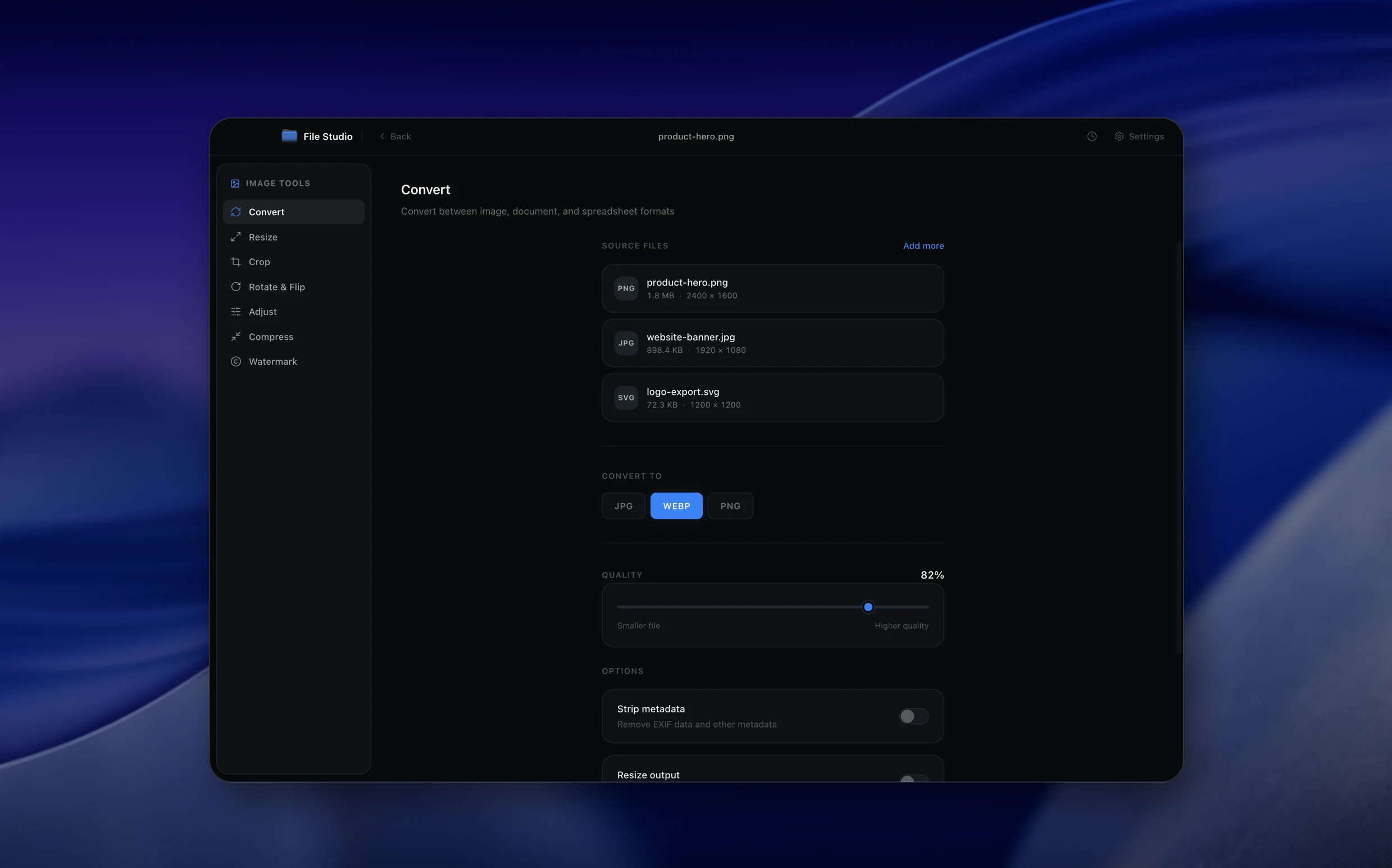
Understanding the WebP format
WebP is an open image format introduced by Google in 2010. Its lossy mode is built on the VP8 video codec's intra-frame coding (similar to a single keyframe of a video), while its lossless mode uses a custom predictive transform with arithmetic coding. WebP files are wrapped in a RIFF container and support 8-bit RGB or RGBA, ICC color profiles, EXIF metadata, XMP metadata, and animation. Browser support is universal as of 2024 across Chrome, Firefox, Safari, Edge, and Opera.
Converting JPG to WebP almost always produces a smaller file at equivalent or better visual quality. WebP's intra-frame predictor and adaptive quantization typically beat JPG's DCT by 25 to 35 percent at the same perceived quality. Unlike JPG, WebP also supports alpha transparency, so a logo on a transparent background can be stored in a single file rather than requiring a PNG. The conversion is lossy in both directions (JPG and lossy WebP both discard data), so each generation accumulates additional loss.
The pragmatic reason to perform JPG-to-WebP conversion is to reduce page weight and improve Core Web Vitals scores without changing source pipelines. A library of 8 megabyte vacation photos becomes 2 to 3 megabytes as WebP at quality 80, with no visible difference on a typical display. The downside is that the converted WebP carries forward all the artifacts that the original JPG already had, plus a small additional generation of loss from the WebP encoder.
How it works
Convert JPG to WebP in four simple steps.
The flow mirrors the main File Studio experience: install the app, drop in your files, pick the right tool, and export clean, ready-to-share output. All without sending anything to the cloud.
Install File Studio
Download the app, move it to Applications, and open it. No sign-ups or accounts required.
Add your JPG files
Drag-and-drop your jpg files into the window or click to browse from disk.
Choose JPG → WebP
Pick the dedicated tool, then adjust resolution, quality, and page range until the preview feels right.
Export & keep working
Select an output folder and run the conversion. Your originals stay untouched on your device.
Best practices for cleaner results
- ·Group related files into folders before converting so your output stays organized and easy to archive.
- ·Use higher resolution presets when you know the result will be printed, zoomed in, or reused in design tools.
- ·Keep an unedited copy of your original JPG files for audits, record-keeping, or compliance workflows.
- ·Combine this tool with other File Studio actions like compress, merge, or split to streamline entire document pipelines.
Why File Studio
Built for trustworthy, everyday JPG to WebP work.
You get precise control over the output, predictable file names, and a private workflow that keeps sensitive documents on your own machine.
Features tuned for this conversion
- ·Quality slider for precise size vs. quality balance.
- ·Preserve EXIF metadata or strip for smaller files.
- ·Side-by-side quality comparison preview.
Why use File Studio for this conversion?
- ·25-35% smaller files than equivalent JPG quality.
- ·Ideal for web performance optimization.
- ·Batch convert entire photo libraries.
Real-world ways people use it
- ·Optimize blog images for faster loading.
- ·Reduce e-commerce product photo file sizes.
- ·Prepare photos for modern web applications.
Settings guide
Understanding your conversion options
Quality factor
WebP lossy quality runs 0 to 100 and is not directly comparable to JPG quality numbers. WebP quality 80 produces roughly the same visual fidelity as JPG quality 90 while being 25 to 35 percent smaller. Quality 75 is the standard for high traffic web images. Quality below 60 introduces visible smoothing.
Compression method (effort)
The method parameter (0 to 6) controls how exhaustively the encoder searches for the best prediction mode. Method 6 takes the longest but produces the smallest file. Method 4 is the practical default for batch processing. Method 0 is essentially real-time encoding with larger output.
Sharp YUV conversion
When encoding lossy WebP, RGB pixels are converted to YUV before quantization. The default conversion can soften edges. Enabling the sharp YUV option uses a slower but more accurate conversion that preserves edge contrast, which matters for images with text overlays or graphic elements alongside the photograph.
Metadata preservation
JPG EXIF, IPTC, and ICC profile data can be carried over into WebP. Preserve the ICC profile if the source JPG used a wide-gamut color space such as Display P3 or Adobe RGB. Strip EXIF and IPTC if the images will be published publicly and may contain GPS coordinates or camera serials.
Auto-filter and spatial noise shaping
Auto-filter lets the encoder pick the optimal in-loop deblocking strength per region. Spatial noise shaping (SNS, default 50) controls how aggressively the encoder allocates bits to detailed areas versus smooth ones. Higher SNS values protect detailed regions at the cost of background fidelity.
Industry standards and requirements
Google PageSpeed Insights actively penalizes JPG and PNG assets that could be served as WebP or AVIF. The Largest Contentful Paint metric, a Core Web Vitals signal that affects search ranking, improves measurably when hero images shrink from JPG to WebP. The recommended pattern for new sites is to store WebP at the origin and let the CDN regenerate JPG fallbacks for legacy clients.
Cloudflare Polish, Fastly IO, AWS CloudFront, and Vercel Image Optimization all perform on-the-fly JPG to WebP conversion based on the client's Accept header. Pre-converting at the source eliminates the per-request CPU cost, lowers CDN bills, and gives more predictable results since the encoder version stays under your control.
For social media and messaging, WhatsApp uses WebP for stickers, Twitter accepts WebP uploads (converted internally), and Discord supports WebP natively. Facebook and Instagram still convert all uploads to JPG internally, so converting JPG to WebP before uploading to those platforms provides no benefit. For your own website, blog, or portfolio, WebP is the right modern choice.
Troubleshooting
Common issues and how to fix them
WebP shows the same compression artifacts as the source JPG→
WebP cannot remove pre-existing JPG artifacts. The conversion only re-encodes the pixels that the JPG decoder produced. To get a clean image, re-encode from the original RAW or design source rather than from the JPG.
Output WebP is larger than the source JPG→
This is unusual for photographs but can happen when quality is set above 90 or when lossless mode is selected by accident. Drop quality to 75 to 80 and confirm lossy mode. Also verify that EXIF and large ICC profiles are not being inflated by the encoder.
Colors look faded after conversion→
The ICC profile is not being copied into the WebP output. Without the profile, color-managed browsers fall back to sRGB and wide-gamut images appear desaturated. Enable ICC preservation in the encoder settings.
Some platforms reject the WebP upload→
A small number of CMSes and marketplace systems still do not accept WebP uploads (notably Amazon Seller Central). Keep JPG masters and only convert WebP for systems that accept it, such as your own website or modern CDNs.
Pricing
Simple, fair pricing.
All tools included. No hidden fees. Processing stays on your device.
Yearly
For short-term projects.
- 1 year of updates
- Image, PDF, SVG, and spreadsheet tools
- Works on Mac & Windows
- All processing done on device
Lifetime
One purchase. Keep it forever.
- Unlimited conversions forever
- 1 year of major updates
- Image, PDF, SVG, and spreadsheet tools
- Watch Folders & Automation
- macOS Notch Drop Zone
- Works on Mac & Windows
Team & Bulk Pricing
Lifetime seats with volume discounts. More seats, bigger discount.
15
lifetime seats
You save
$60
15% off the individual price
Enterprise
50+ seats with custom pricing, centralized license management, and priority support.
FAQ
Frequently asked questions
Will WebP look worse than my JPG?→
At equivalent file sizes, WebP often looks better than JPG. At equivalent quality, WebP files are significantly smaller.
How much smaller will WebP files be?→
Typically 25-35% smaller than JPG at similar visual quality. Some images see even greater reductions.
Is WebP good for photos?→
Excellent. WebP was designed specifically for web photos and performs very well with photographic content.
Should I convert all my JPGs to WebP?→
For web use, yes. For archiving or compatibility with older software, you might keep JPG originals.
Do all browsers support WebP now?→
Yes. All modern browsers including Safari (since 2020) now support WebP. Only legacy browsers lack support.
Can I preserve photo metadata in WebP?→
Yes. File Studio can preserve EXIF data including camera info, date, and location in WebP files.
Looking for something else? Explore more offline conversions with File Studio: