

AI guide
How to connect File Studio to Claude
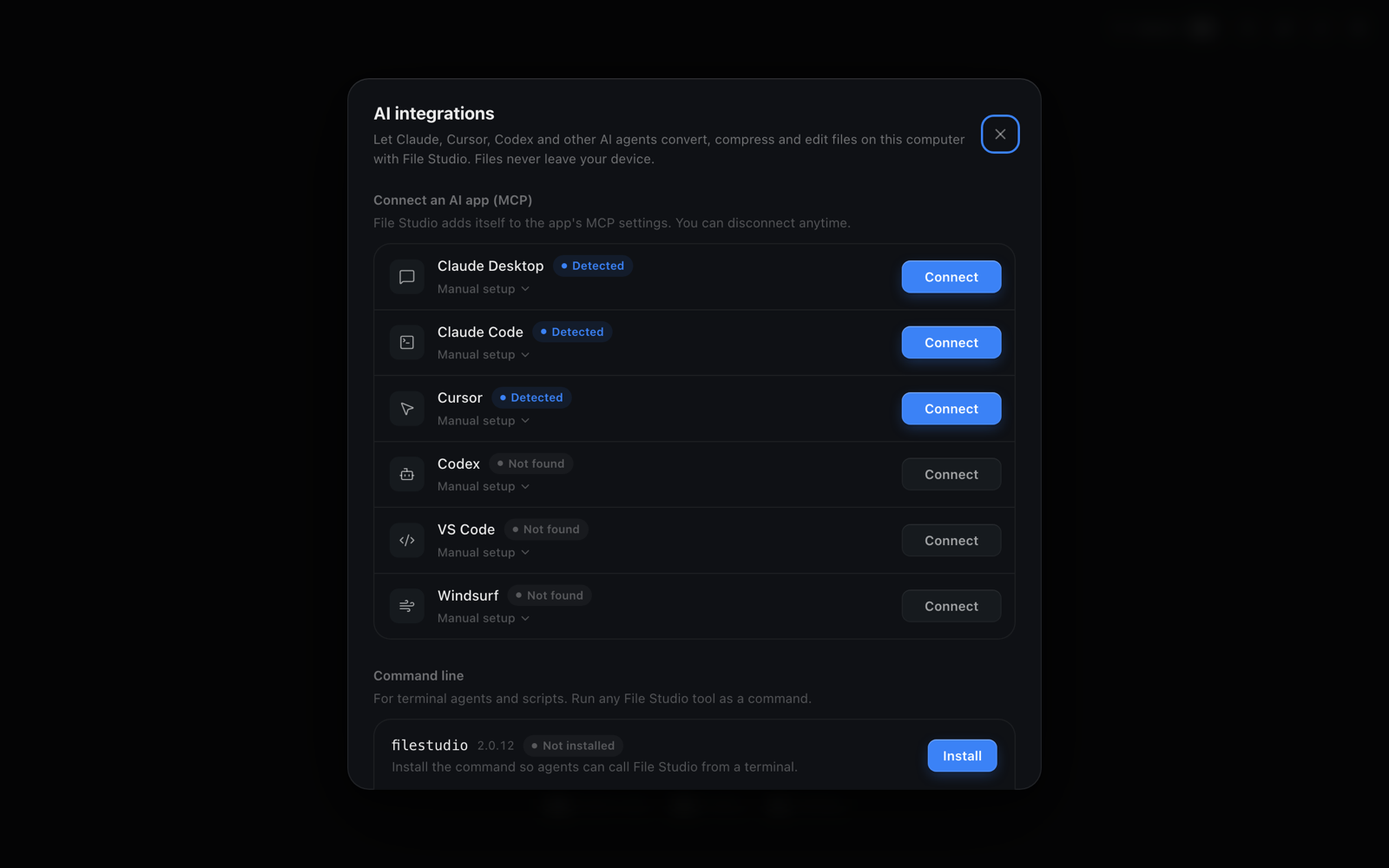
To connect File Studio to Claude, open File Studio, go to AI integrations, and click Connect next to Claude Desktop or Claude Code, then restart Claude. File Studio adds its local MCP server to Claude's settings, so Claude can merge, compress, convert, and edit files on your computer without uploading them anywhere.
By Ayush Soni · Updated October 21, 2026
Step by step
- 1
Open AI integrations in File Studio
Launch File Studio and open AI integrations. File Studio lists the AI apps it finds on your computer.
- 2
Click Connect next to Claude Desktop or Claude Code
File Studio writes its MCP server entry into Claude's configuration for you. You can click Disconnect at any time to remove it.
- 3
Restart Claude
Quit and reopen Claude Desktop, or start a new Claude Code session. File Studio's tools now appear in Claude's tool list.
- 4
Ask Claude to work with your files
Try a prompt like "Compress every PDF in ~/Downloads and put the results in a compressed folder." Claude calls File Studio, which does the work locally.
Manual setup
Manual setup for Claude Desktop: add the JSON below to claude_desktop_config.json (on Mac it lives in ~/Library/Application Support/Claude/, on Windows in %APPDATA%\Claude\), then restart Claude.
Manual setup for Claude Code: run claude mcp add filestudio -- filestudio mcp in your terminal.
Manual setup needs the filestudio command on your PATH. Install it from AI integrations, under Command line.
{
  "mcpServers": {
    "filestudio": {
      "command": "filestudio",
      "args": ["mcp"]
    }
  }
}
claude mcp add filestudio -- filestudio mcpTry File Studio free
Every tool runs locally on Mac and Windows. No uploads, no account.
FAQ
Frequently asked questions
Do my files get uploaded to File Studio or the AI provider?
No file is uploaded by File Studio. The MCP server and the filestudio command run on your computer and read and write files on your disk. Your AI app only sees the text it sends and receives, such as file paths and results, never a copy of the file sent through File Studio.
Does it work with both Claude Desktop and Claude Code?
Yes. Both are listed in AI integrations with their own Connect button. Claude Code can also call the filestudio command directly from the terminal.
Claude doesn't show the File Studio tools. What should I check?
Fully quit and reopen Claude after connecting. If it still doesn't appear, open Manual setup in AI integrations, confirm the config file path shown there contains the filestudio entry, and make sure the filestudio command is installed.
Related:
More guides: